XREAL AR Glasses Review: Which Model Is Right for You?
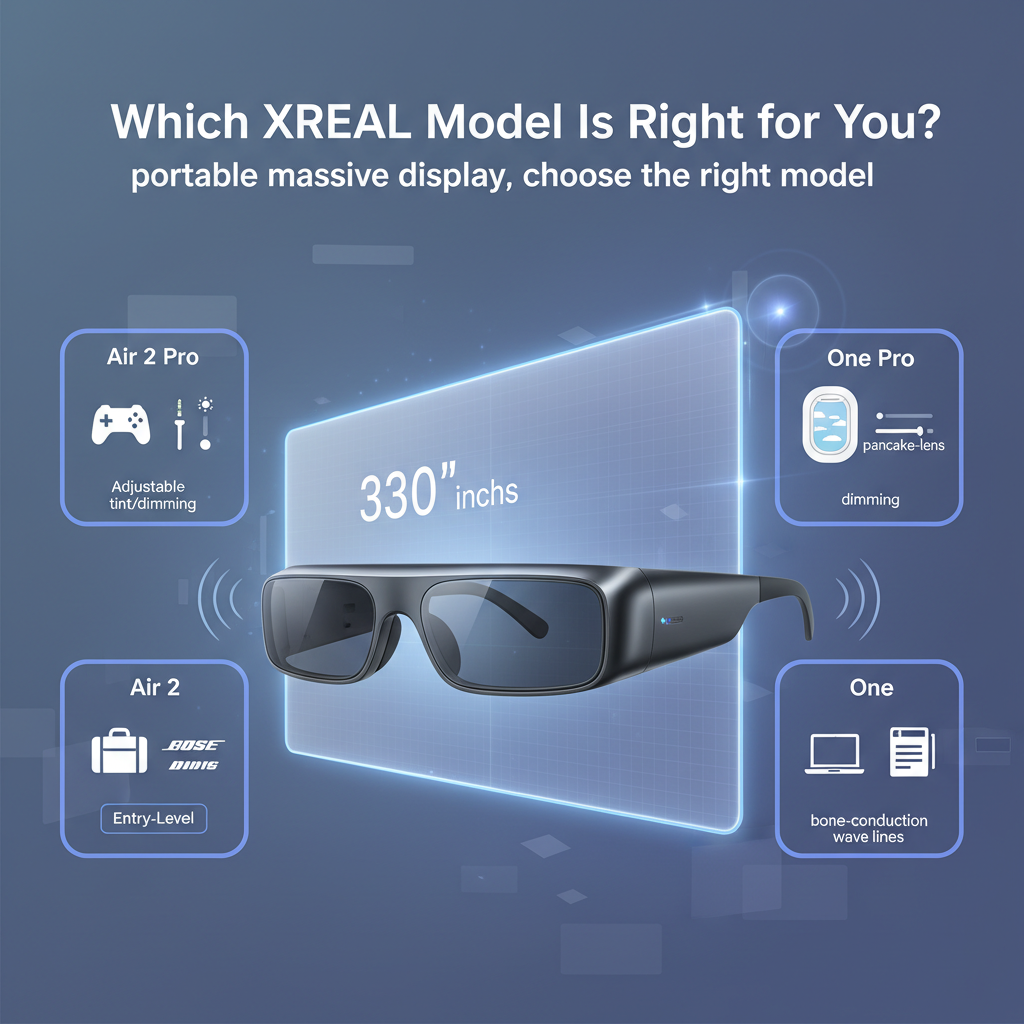
XREAL AR Glasses Review: Which Model Is Right for You?
Imagine replacing your 65-inch TV, your gaming monitor, and your second work screen — with a pair of glasses that weigh less than a baseball.
I know. It sounds like sci-fi. But here’s the thing — we’re already there.
The AR glasses market in 2024–2025 is exploding with options, and XREAL is leading the charge with models like the Air 2, Air 2 Pro, XREAL One, and One Pro. But honestly? The differences between them aren’t always obvious. Pay too little and you miss features that actually matter. Pay too much and you’re buying hardware you’ll never use.
I’ve spent the last few months testing these glasses across different scenarios — gaming sessions, cross-country flights, work-from-home days — and I’m going to walk you through everything. No marketing fluff. Just what actually works, what doesn’t, and which model makes sense for your specific needs.
What Are XREAL AR Glasses — And Why Should You Care?
Let’s clear something up first. XREAL glasses aren’t VR headsets. You’re not strapping on a bulky Meta Quest and disappearing into a virtual world. These are augmented reality glasses that look more like slightly chunky sunglasses than sci-fi goggles.
The magic? They project what XREAL calls a “330-inch virtual TV display” into your field of vision. Now, that measurement is a bit of marketing speak — it’s based on viewing distance and perceived screen size — but the experience is legitimately impressive. You know that feeling of sitting in the front row of a movie theater? That’s the vibe.
What makes XREAL different from competitors is their focus on smartphone compatibility and accessible pricing. While Apple’s Vision Pro will set you back $3,500, XREAL’s lineup ranges from around $400 to $700. That’s the price of a decent monitor, not a used car.
And they’ve been iterating fast. The original XREAL Air launched to solid reviews, but the company didn’t rest. They released the Air 2 with improved visuals, then the Air 2 Pro with enterprise features, then the Air 2 Ultra (which I won’t cover here since it’s more experimental), and most recently the XREAL One and One Pro — which honestly feel like a complete reimagining of what consumer AR glasses should be.
In my experience, XREAL has positioned itself as the practical middle ground. You’re not getting the full spatial computing experience of a Vision Pro. But you’re also not paying rent money for the privilege of watching Netflix on a virtual screen.
XREAL Model Lineup Explained — Which One Matches Your Life?
Okay, let’s break down the actual models. Because this is where people get confused.
XREAL Air 2: The Solid Foundation
This is your entry point. The Air 2 is lighter than the original Air glasses and delivers strong visual performance for the price. If you’re mainly interested in media consumption — watching movies on flights, streaming shows in bed without disturbing your partner, that kind of thing — the Air 2 handles it beautifully.
But here’s what you’re giving up: no electrochromic dimming (we’ll get to that), no advanced spatial features, and a more basic audio setup. It’s the reliable Honda Civic of AR glasses. Does the job, does it well, doesn’t try to be fancy.
XREAL Air 2 Pro: The Professional’s Choice
Now we’re talking. The Air 2 Pro typically runs around $500 and brings one killer feature to the table: electrochromic dimming. Translation? You can adjust how dark the lenses get with a button press.
Why does this matter? Because one of the biggest problems with AR glasses is ambient light. You’re trying to watch content, but sunlight is washing out your view. The Pro model solves this elegantly — just dial up the tint level. I’ve used these on sunny patios and bright office spaces, and the difference is night and day (pun intended).
The Air 2 Pro also supports 3 Degrees of Freedom (3DoF), which means you can pan around 360° videos and scenes. It’s not full spatial tracking like a VR headset, but it’s enough to make immersive content feel genuinely immersive. And at around 4 grams lighter than the original Air glasses, you barely notice them after the first few minutes.
Best for: enterprise users who need to work in varying light conditions, productivity warriors, anyone serious about immersive media.
XREAL One: The Gamer’s Dream
This is where things get interesting. The XREAL One feels like a different product philosophy entirely. It features adjustable IPD (interpupillary distance) — basically the distance between your pupils — which is crucial for gaming comfort. Get this wrong and everything looks slightly off, causing eye strain.
But the real standout? Bone conduction audio technology. No earbuds. No headphones. The sound travels through your skull bones directly to your inner ear. I was skeptical at first (it sounds weird, right?), but it’s genuinely impressive for gaming. You get immersive audio without blocking out your surroundings completely.
Think of the One as a gaming monitor you wear. It’s designed for distraction-free viewing sessions where you want to lose yourself in the game but still hear if someone’s calling your name.
XREAL One Pro: The Premium Experience
If the One is great, the One Pro is exceptional. You get upgraded pancake lenses that deliver a sharper, wider field of view compared to the traditional “bird bath” optics in the base One model. The difference is subtle but noticeable — text is crisper, edges are cleaner, and the sweet spot where everything looks perfect is larger.
And then there’s the audio. Integrated Bose speaker experience. Look, I’ve tested a lot of AR glasses, and most have mediocre sound. The One Pro doesn’t. It’s the kind of audio quality where you forget you’re not wearing premium headphones.
Best for: power users, frequent travelers who want the best portable entertainment setup, anyone who wants enhanced AR features and doesn’t mind paying extra for quality.
What’s It Actually Like to Use These Things?
Specs are great. But what matters is real-world performance.
Visual Performance: Does the 330-Inch Claim Hold Up?
Short answer: mostly yes, with caveats.
The visual reproduction across all XREAL models is impressive. Colors are vibrant, blacks are deep (especially with the Air 2 Pro’s dimming feature), and the perceived screen size genuinely feels massive. When I watch movies on the One Pro, it’s like having a private IMAX screen.
But — and this is important — the field of view isn’t infinite. You’re looking at roughly 46-50 degrees depending on the model. That means you see a large virtual screen, but it doesn’t fill your entire vision. Some people love this because it keeps you grounded in reality. Others find it limiting.
The pancake lenses in the One Pro make a real difference. I tested them side-by-side with the standard lenses in the base One, and the Pro version has noticeably less edge distortion. If you wear these for hours at a time, that matters.
Comfort: Can You Actually Wear These All Day?
Here’s where things get surprisingly subjective.
The Air 2 Pro weighs about 4 grams less than the original Air glasses, which doesn’t sound like much until you’ve worn them for three hours straight. Every gram counts when it’s sitting on your nose. I’ve found the weight distribution across all models to be pretty good — better than most sunglasses I own.
But nose pad adjustment is critical. If they’re not positioned correctly, you’ll get blurry edges and discomfort. I spent a solid 10 minutes fiddling with the fit when I first got each model, and it was time well spent. Once they’re dialed in, they disappear.
One thing I appreciate: the glasses form factor means no headset fatigue. With VR headsets, I tap out after 90 minutes max. With XREAL glasses, I’ve done 4-hour gaming sessions without issue. Your mileage may vary, but the lighter design makes a huge difference.
And yes, they work with prescription lenses. XREAL sells inserts, or you can use third-party options.
Audio: Bone Conduction vs. Bose Integration
The bone conduction audio in the XREAL One is fascinating. It’s immersive without isolating you from your environment — perfect for when you’re gaming at home but need to hear the doorbell or your kids calling. The sound quality is solid, though not quite as rich as traditional speakers.
The Bose integration in the One Pro, though? That’s premium. Deep bass, clear mids, crisp highs. I’ve used these on flights instead of my Sony WH-1000XM5 headphones, and the experience is comparable. You’re not carrying separate audio gear, which is a game-changer for travel.
XREAL vs. The Competition — How Do They Stack Up?
You’re probably wondering how XREAL compares to other players in the space.
XREAL vs. Rokid Smart Glasses
Rokid is XREAL’s closest competitor in terms of price and features. The philosophical difference? XREAL plays nicer with Mac and Windows productivity ecosystems, while Rokid leans into Android-based media streaming.
For gaming, XREAL has a slight edge in performance and comfort — at least in my testing. But honestly? The field of view comparison between the two is close enough that your choice might come down to which ecosystem you’re already invested in.
Comfort is surprisingly subjective between these brands. Some people swear by Rokid’s fit, others prefer XREAL. If possible, try both before committing.
XREAL vs. Ray-Ban Meta Smart Glasses
These are fundamentally different products. Ray-Ban Meta glasses are fashion-forward, camera-equipped, social-media-optimized devices with AI features. They’re about capturing moments and staying connected.
XREAL glasses are about consuming content and working on a massive virtual screen. No cameras, no social features, just pure display performance.
If you want smart glasses that look normal and help you stay connected, get the Ray-Bans. If you want a portable theater and productivity tool, get XREAL.
XREAL vs. Apple Vision Pro
This comparison feels almost unfair because of the price gap. The Vision Pro is $3,500. The most expensive XREAL model is around $700.
What you get with Vision Pro is full spatial computing — hand tracking, eye tracking, complete AR/VR immersion, and Apple’s ecosystem integration. It’s a computer you wear on your face.
What you get with XREAL is a focused tool that does one thing exceptionally well: projects a massive virtual display for media and productivity. No hand tracking, no spatial apps, but also no $3,500 price tag and no battery pack tethered to your pocket.
XREAL has positioned itself as an “Apple Vision alternative” for people who want the core display experience without the complexity or cost. And honestly? For most use cases — watching movies, gaming, working on documents — XREAL delivers 80% of the value at 20% of the price.
So Which XREAL Model Should You Actually Buy?
Let me make this simple.
Get the XREAL Air 2 if: You want to dip your toes into AR glasses without spending a fortune. Media consumption is your main goal. You don’t need advanced features.
Get the XREAL Air 2 Pro if: You work in varying light conditions and need that electrochromic dimming. You’re using these for productivity and enterprise applications. The extra $100-150 over the base Air 2 is worth it for the flexibility.
Get the XREAL One if: Gaming is your primary use case. You want adjustable IPD for comfort and bone conduction audio. You appreciate the distraction-free viewing experience without complete isolation.
Get the XREAL One Pro if: You want the best XREAL has to offer. Those pancake lenses and Bose audio make a real difference. You travel frequently and want premium portable entertainment. Budget isn’t your main concern.
In my experience, the sweet spot for most people is either the Air 2 Pro or the XREAL One. The Pro gives you professional features and versatility. The One gives you gaming-optimized performance and innovative audio. Both deliver on the core promise of a massive virtual display in a portable package.
Final Thoughts: Is XREAL Worth It?
Look, AR glasses aren’t for everyone. If you’re perfectly happy with your current setup, you don’t need these.
But if you’ve ever wished you could work on a second monitor while traveling, or watch movies on a massive screen without actually owning a massive screen, or game without commandeering the living room TV — XREAL delivers. These aren’t gimmicks. They’re legitimately useful tools that solve real problems.
The technology isn’t perfect yet. You’ll need to adjust the fit carefully. The field of view has limits. And yes, you’ll look a bit odd wearing them in public (though they’re getting more socially acceptable by the day).
But the value proposition is solid. For $400-700, you’re getting a portable display that rivals premium monitors and TVs. That’s remarkable.
Ready to experience the future of personal displays? Start with the model that matches your primary use case, give yourself a week to adjust to the form factor, and don’t be surprised when your old screens start gathering dust.